
Leaving HubSpot: export, remap, carry the history over
 By Marceau· Kasar Team
A HubSpot export hands you columns and identifiers, in three datasets that do not leave through the same door. What decides a migration is not the export, it is the mapping table and the order in which you run it.
Leaving HubSpot means extracting three separate datasets, and only one of them comes out in a click. Records and their properties export from each object index, in CSV, XLS or XLSX. Associations are relationships between identifiers, not columns. Activities, meaning logged emails, calls and meetings, are separate objects with their own API endpoints.
So the migration is not decided by the export, it is decided by the mapping table: which property becomes which field, which one is calculated and has no equivalent, which identifier serves as the join key. Then by the import order: companies, contacts, deals, activities, associations. Plan for two to four weeks of double run, with HubSpot kept open read only.
Facts checked on September 6, 2026 against knowledge.hubspot.com, developers.hubspot.com and the vendor's public pricing pages. Export mechanics and pricing tiers change: every point below should be reverified at its source before it goes into a cutover plan.
What triggers a departure is not the product, it is the billing base
A HubSpot account bills on two different bases at the same time. The hubspot.com/pricing/marketing page states that contacts flagged as marketing contacts count toward the paid contact tier, and that non marketing contacts can be stored free up to fifteen million records. The hubspot.com/pricing/sales page states that paid Sales Hub plans are priced per seat.
The invoice therefore tracks database size as much as headcount: five reps who import forty thousand contacts move up a tier without a single extra login. The setting that avoids it costs nothing, but it assumes someone sorts a database inherited from bought lists. This pricing structure does not produce dissatisfaction with a feature, it produces a cost that grows with inventory, and that cost decides what has to come out.
What a HubSpot export actually returns, and in how many files
From an object index, contacts, companies, deals or tickets, the export produces a CSV, XLS or XLSX file. The export documentation on knowledge.hubspot.com states that the file arrives as an email carrying a download link, and that the link expires after 30 days. That is dataset one, one row per record, the one everyone assumes is enough.
Dataset two is associations. The same page documents two options: the associated record name, which carries up to one thousand associated record ID values per association column, or all associated records, available for CSV files only. Past a thousand associations on a single record, the column stops being exhaustive and the rebuild goes through the API.
Dataset three is activities. On developers.hubspot.com, calls, emails, meetings, notes and tasks are engagement objects in their own right: a call is created with a POST request to /crm/v3/objects/calls, then explicitly associated with a record. A contact index export therefore contains neither the body of an email nor the duration of a call.
Remapping: a HubSpot property is not a field
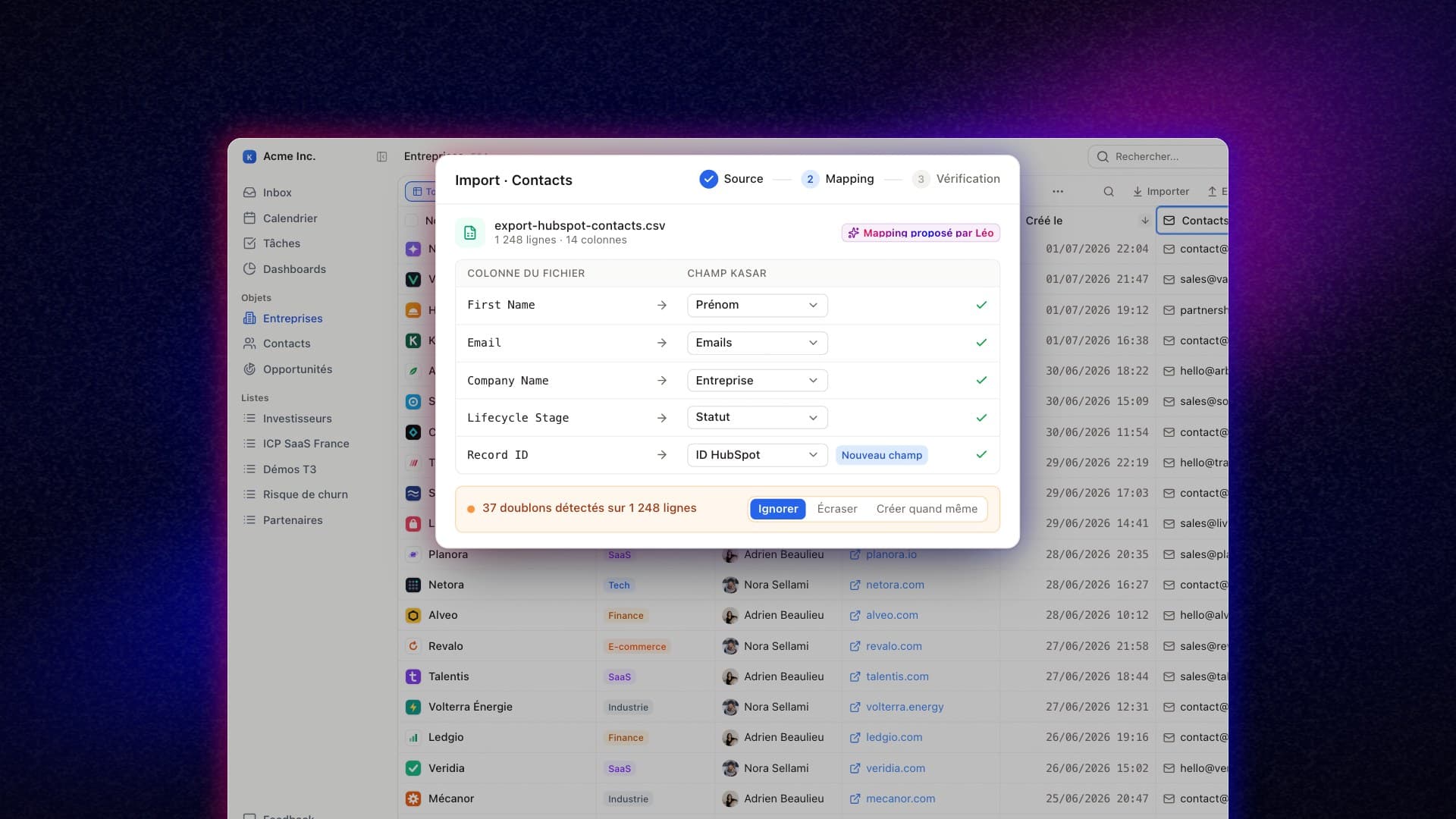
The mapping table is the real deliverable of a migration. One row per property, five columns: HubSpot internal name, display label, type, target field, transformation to apply. It gets built before the export, because it determines which columns to pull and which properties not to migrate at all. Three families resist the move, and each one breaks differently.
Calculation properties first. The property documentation on knowledge.hubspot.com states that a field type can be switched neither to Calculation nor away from it, so the formula cannot be turned into a plain value before the export. It comes out frozen, and in the target you either rebuild the formula or accept a snapshot dated the day of the extraction.
Owners next. On developers.hubspot.com, an owner identifier is the value to use when assigning an owner to a record or an activity, and those endpoints are read only. Deal stages last: defined inside a given pipeline, their name is not enough to place a deal again, you also need the source pipeline.
That leaves the join key. The import documentation on knowledge.hubspot.com lists, for matching a row to an existing record, the Record ID, the email for contacts, the domain name for companies and a property that requires unique values. Record ID, it adds, supersedes any other unique identifier in the import: keep it in a text field on the target.
A CRM migration is not decided by the export: the file comes out in a few hours, the mapping table takes a week to build, and it decides everything else.
History: what transfers, what gets recaptured, what is lost
That table describes the present state of records, not their past, and the past is what the team will open on day one. It splits into three categories, and confusing them is the most expensive mistake made after a cutover. The job is to separate what must be imported from what rebuilds itself once the channels are reconnected.
- What transfers: notes, tasks, meeting write-ups, bodies of logged emails, call dates and durations. These are engagement objects attached to an identifier, and they import as such if the Record ID was preserved.
- What gets recaptured: the email thread itself. Reconnecting the Gmail or Outlook mailbox to the new CRM rebuilds the exchanges from the mailbox, which becomes the source of truth again instead of the copy the previous CRM held.
- What is lost: opens and clicks, predictive scores, workflow statistics, property level change logs. That data is derived from other data, and no import recomputes it.
The law does not rescue that third category, and not in the same way on both sides of the Atlantic. Article 20 of the GDPR grants portability only over the personal data the individual has provided to a controller, in a structured, commonly used and machine readable format. A predictive score is inferred, not provided.
In the United States the logic is different. The California Consumer Privacy Act places inferences drawn from other information to build a profile inside the definition of personal information, at section 1798.140(v)(1)(K). And opinion 20-303 of the California Attorney General, issued on March 10, 2022, concludes that a consumer has the right to know internally generated inferences about them.
Deduplicate before the cutover, never after
Recapture writes interactions into the same place as the import, and the overlap manufactures duplicates. And knowledge.hubspot.com documents a narrow native deduplication: when a record is created, HubSpot looks for a matching value in the Email property for a contact, and in the Company domain name property for a company. The source database is therefore clean on those two keys, dirty on the rest.
The same person with two addresses is two records, two subsidiaries sharing a domain are one, and the target will not use the same keys: a number in E.164 becomes a matching key there where HubSpot never made one. So the order is not negotiable: merging in the file only deletes a losing row, while merging after the import forces every association to be redirected to the survivor.
What HubSpot does better, and when not to leave
With the cost of the operation priced, the question flips: what do you lose by leaving? HubSpot marketing automation is a complete product, forms, landing pages, bulk email, workflows, scoring, attribution. A CRM that covers sales does not replace it. And if marketing lives inside it, migrating the sales side alone cuts the link between the form someone fills in and the record that gets updated, the very link that feeds the pipeline.
So there are cases where you stay. If the invoice is driven by seats rather than contacts, if the marketing workflows genuinely run, if three years of reporting sit on top of the data, renegotiating at renewal costs less than a migration. Only once that trade-off is settled does a cutover plan mean anything.
The four-step plan and the double run window
Step one, freeze the model. No new property, no new pipeline in HubSpot during preparation. A column created after the export does not exist in the mapping table, and nobody will notice until a rep goes looking for it in the new tool, three weeks after the cutover.
Step two, import in dependency order: companies, then contacts, then deals, then activities, then associations. Each step is validated on a count. If the export announces 12,480 contacts and the import creates 12,106, the gap gets documented right away, row by row, and not at the end of the project.
Step three, the double run. Both tools run in parallel for two to four weeks: writing in the new one, read only in HubSpot. It is the only setup that makes a mapping error visible, because it shows up on a live deal being negotiated rather than on a test dataset nobody reads twice.
Step four, the contractual exit, counted backward from the end of the double run rather than from the decision. The EU Data Act, applicable since September 12, 2025, caps the notice period for initiating a switch at two months in its Article 25(2), and sets the maximum transitional period at 30 calendar days.
Two caveats on that text. Its Article 29 bans switching charges only as of January 12, 2027. And its Article 30 reserves functional equivalence for providers of infrastructural computing resources: for application software the duty shrinks to exporting exportable data in a structured, commonly used and machine readable format.
Six questions to settle before clicking Export
A cutover is prepared through six written answers. None of them requires a tool, and all six fit into half a day with a HubSpot admin and whoever will own the new CRM. They apply to any target, including the one you have not picked yet.
- Real volume: how many records per object, how many properties are actually populated, and below which fill threshold a property gets deleted instead of migrated.
- Calculated properties: which ones become a formula again in the target, which ones stay a frozen value carrying its calculation date.
- The join key: which field in the new CRM receives the HubSpot Record ID, and who verifies that it survived the import.
- The history split: which activities are imported, which ones get recaptured, and at what cutoff date.
- Deduplication: on which key, applied to the file before the import, with a written rule for the surviving record.
- The end of the double run: that date starts the two month contractual notice period, and it alone costs money.
Those six answers matter more than the choice of tool: they make the migration reversible, including toward a third CRM two years from now. A team that knows where its Record ID lives, what gets recaptured and what is lost never moves house blind again.
Kasar is an AI-native CRM. Its agent, Leo, captures interactions across email, LinkedIn, WhatsApp, calendar and calls, which moves part of the history to the recaptured side rather than the imported one, and the product exposes an MCP server. The six questions above apply to Kasar exactly as they apply to any other target.
Frequently asked questions
Do not bet on it. How long a cancelled account stays reachable depends on the terms you signed, and that clause is read before cancellation, not after. The operating rule fits in one sentence: run the full export while the subscription is active, and keep the resulting files outside the tool, with their production date. Mind the expiry too: knowledge.hubspot.com states that an export download link expires after 30 days.
The export takes a few hours, the mapping table takes a week, the double run takes two to four weeks. For a standard database with contacts, companies, deals and activities, no custom objects and no bespoke integrations, the whole thing fits in six calendar weeks. What stretches the timeline is almost never volume, which is handled in batches: it is calculated properties, the third-party tools wired into HubSpot, and the number of people who have to approve the mapping.
Both, depending on the source. When the original mailbox still exists and can be connected to the new CRM, recapture wins, because the mailbox becomes the source of truth again instead of the copy the previous CRM held. Importing stays necessary for exchanges whose mailbox is gone, typically those of a rep who left the company. Set a cutoff date: after it you recapture, before it you import.
The law guarantees that you get your data back, not that you get your CRM back. The EU Data Act, applicable since September 12, 2025, caps the switching notice period at two months and the transitional period at 30 calendar days, extendable to a maximum of seven months if the provider demonstrates technical infeasibility within 14 working days. Its Article 29 bans switching charges as of January 12, 2027, and its Article 30 reserves functional equivalence for providers of infrastructural computing resources. Article 20 of the GDPR covers only the data the individual provided, and leaves scores and inferred data out.
That is a common scenario, and it hinges on one decision: which system owns the contact record. Two tools writing the same record produce two versions of the truth within weeks. In practice the form stays in HubSpot, the sales record leaves, and only one direction of synchronization is allowed. Watch the billing base: per hubspot.com/pricing/marketing, as long as contacts stay flagged as marketing contacts they count toward the paid tier, migration or not.
Ready to let Leo fill your CRM?
14-day free trial. Sell more, type less.
Try Kasar for freeRead next
What your CRM never records: measuring your capture rate
The category has spent four years arguing from self-reported numbers that move twelve points between two editions of the same report. Capture rate works differently: one division, four conventions, computed on your own logs.
Running your CRM from Claude or ChatGPT: what MCP breaks
An agent connected over MCP reads, writes and sends with equal ease, and the protocol does not tell those three moves apart. The line between what it does alone and what needs a confirmation is drawn inside the CRM server, not inside the protocol.